For electricians, plumbers and HVAC crews
Schedule your techs and invoice your jobs for $49 a month, flat.
Most field service software charges per user. CalSpark is one price for up to 10 people, so hiring a tech does not raise your bill.
14-day free trial. No card required.
Flat price, not per user
This is the main reason to pick CalSpark. You pay the same whether you have 3 users or 10.
CalSpark
$49 / month
Up to 10 users. 14-day free trial, no card.
- One plan
- No per-user fees
- Office and field users both count toward the 10
Others, from their public pricing pages
- Jobber: Core from $49 a month for 1 user, with added users at $29 each. For teams of 2 to 5 and 6 to 10, its page shows Connect from $199 and $299. Client reminders and QuickBooks sync start at Connect.
- Housecall Pro: Basic from $79 a month (1 user), Essentials from $189 (5 users), MAX from $329 (8 users), $35 a month per extra user on MAX.
- ServiceTitan: no published prices. It says pricing is per technician and asks you to request it.
Competitor prices are taken from each company's public pricing page as of October 2026. Plans change. Check their sites before you decide. Those tools also do things CalSpark does not yet. Read the comparisons or run your own numbers.
What works today
This is the full list. It is shorter than the big tools, on purpose.
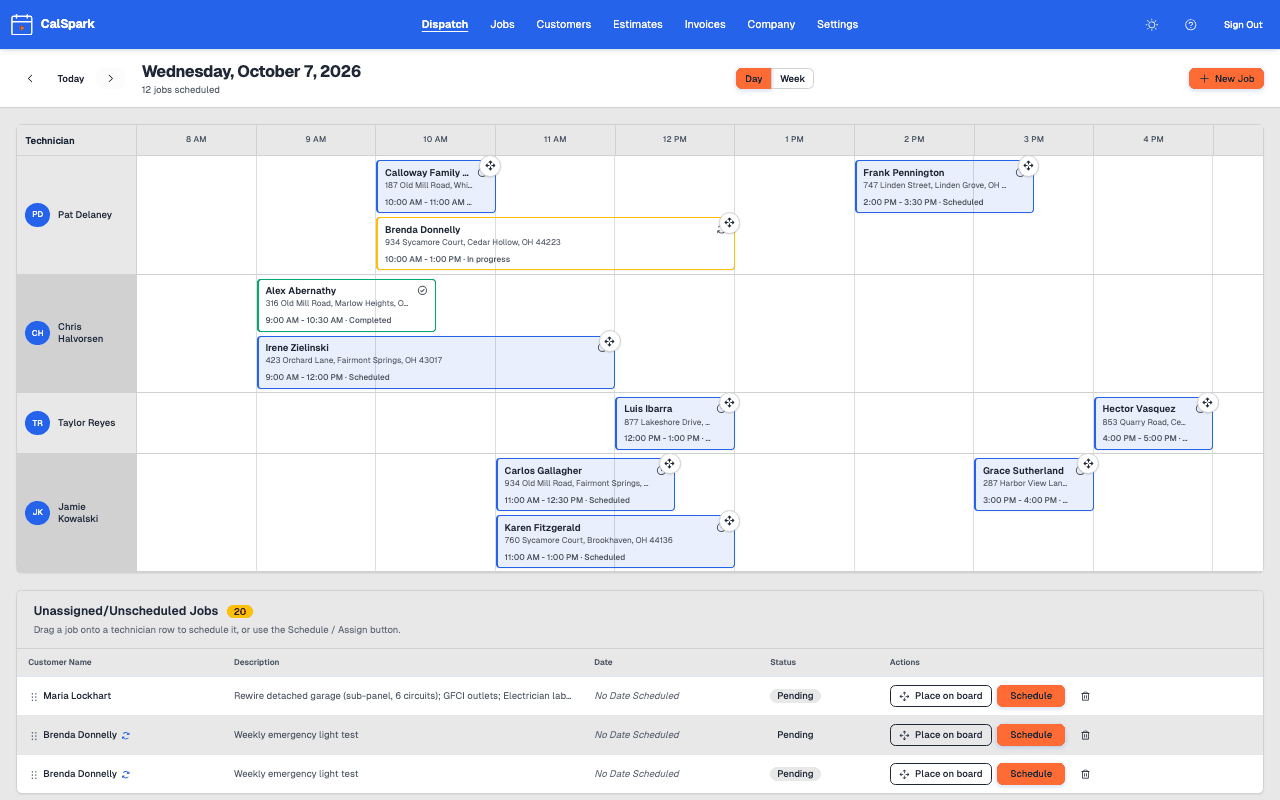
Dispatch board
Day and week views. One row per tech. Click to create a job, drag to reschedule or reassign, drag from the unassigned list. Works by touch on a tablet.
Estimates
Line items, PDF, email and a customer page to approve or decline. Approved estimates become a job and a draft invoice.
Recurring jobs
Repeat a job every N days, weeks or months. Edit one visit or all future visits, skip or end the series.
Automations and Slack
Email templates, a custom automation builder and Slack notifications. Off until an admin switches them on, and fair-use sending limits apply.
Customers, import and export
Many addresses on one customer. Bring your list in from a CSV with column mapping and duplicate checks, and download customers, jobs and invoices as CSV.
Invoices and card payments
Line items, PDF, email, card payment of the balance through your own Stripe account, recorded partial payments and refunds.
Technician view
Techs open their jobs on a phone browser and add job photos, or follow a private calendar feed. The iOS app is not in the App Store yet.
Team roles
Admin, front office and technician. Each sees what their job needs.
Conflict warnings
You get a warning when two jobs overlap for one tech, and can schedule anyway when it is on purpose.
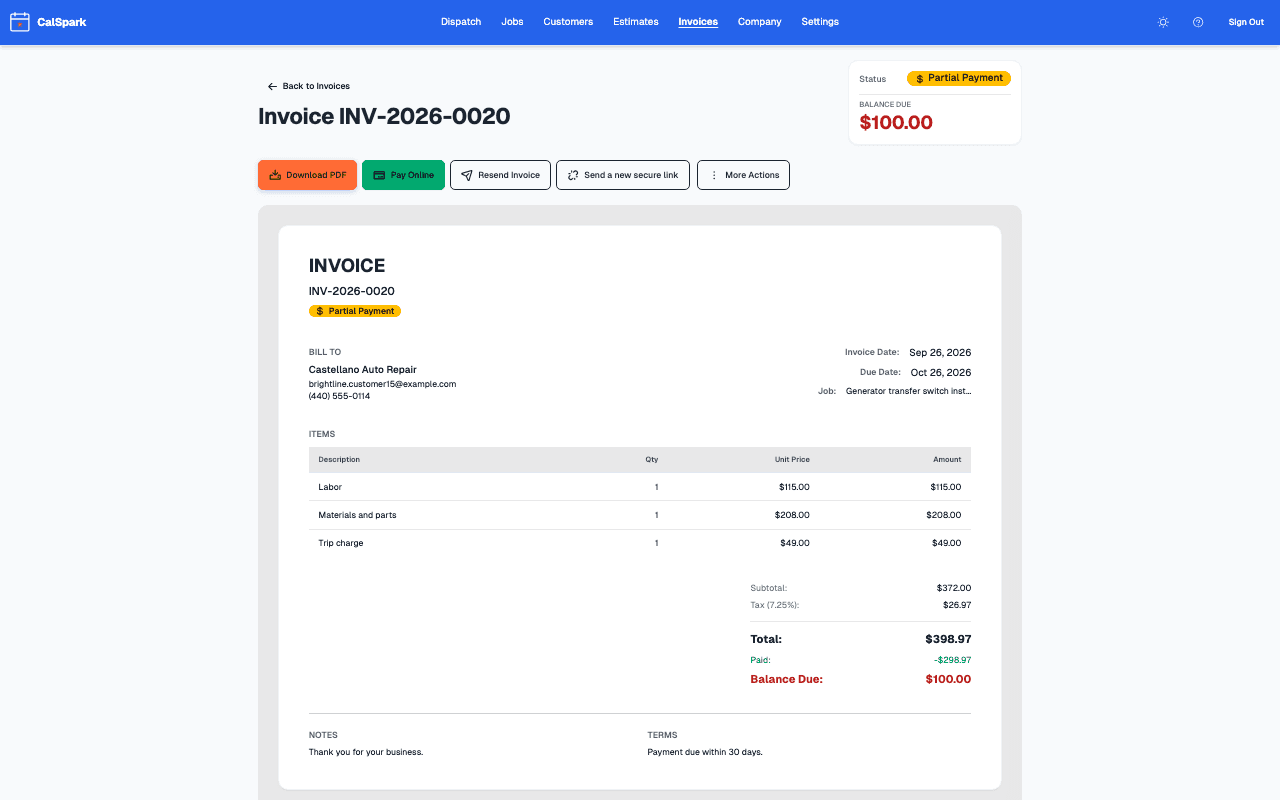
Invoice from the job
Add line items, email a PDF and let the customer pay by card. Money goes to your Stripe account.
How invoicing worksWhat it does not do
Better to know now than after the trial. Planned items are not available and have no date.
- Text messages without your own Twilio account (email reminders exist, and texts are off by default)
- Route optimization
- Reporting dashboards
- Inventory and parts tracking
- Payroll
- Part payments through the online card link. The link collects the full remaining balance and staff record partial payments
- Deposit requests on estimates. An estimate approval is a typed name and a timestamp, not a certified signature
- An Android app, and an App Store listing for the iOS technician app
- QuickBooks Online sync (planned)
- Google Calendar push (one way) (planned)
- A Zapier app (planned)
- An MCP server (planned)
If you need these today, a larger tool is the better pick. We say so on every comparison page.
What is coming. Not available yet.
These are planned or in progress. None of them are available today. We have no dates to promise.
iOS technician app in the App Store
Built, not released.
QuickBooks Online sync
Planned. Built, not available to customers.
Google Calendar push
Planned. Jobs pushed one way into a Google calendar. Calendar feeds are available now.
Zapier app
Planned. Not available. The API and webhooks it would use are available now.
MCP server for AI assistants
Planned. Not available.
Questions
What does it cost?
$49 a month for up to 10 users. One plan. No per-user fees.
Do I need a card to try it?
No. The free trial is 14 days and does not ask for a card.
Does CalSpark text or email my customers appointment reminders?
Email, yes: appointment reminders, booking confirmations, receipts and overdue invoice follow-ups can be switched on in settings. Text messages are not turnkey; they need your own Twilio account and are off by default. The features page lists what works and what does not.
Can I drag jobs around the schedule?
Yes. Click to create a job, drag to reschedule or reassign, and drag from the unassigned list. The board has Day and Week views. On a tablet, press and hold a job to pick it up, or tap Move and tap an empty slot.
Is there an app for technicians?
Technicians can use the web view on a phone today, including job photos. The iOS app is built but not in the App Store yet. There is no Android app.
Can I take card payments?
Yes. You connect your own Stripe account and customers pay invoices online by card. The card link collects the full remaining balance; part payments are recorded by your staff, and refunds show on the invoice too. Stripe charges its own fees.
Can I import my customers?
Yes. Import a CSV file, map your columns, and CalSpark flags duplicates by email or phone before it creates anything.
Does it have estimates and recurring jobs?
Yes. Estimates have line items, a PDF, email and a customer page to approve or decline, and an approved estimate becomes a job and a draft invoice. Recurring jobs repeat every N days, weeks or months, and you can edit one visit or all future visits.
Can I build my own automations or get Slack alerts?
Yes. A custom automation builder lets you choose a trigger, conditions and actions, and Slack notifications use an incoming webhook. Automations are off until an admin switches them on, and fair-use sending limits apply, with lower limits on trial accounts.
Does it connect to QuickBooks or Zapier?
Not yet. QuickBooks Online sync and a Zapier app are planned and not available. A public API and signed webhooks exist, and an admin can export customers, jobs and invoices as CSV.
What if I have more than 10 users?
The plan covers up to 10 users. If you are larger, email support@calspark.app.
Try it with your own jobs
14-day free trial. No card. $49 a month flat for up to 10 users after that.