For plumbers
Scheduling and invoicing for plumbing companies
Plumbing days rarely go to plan. An emergency leak lands at 9 am, a drain job runs long, and the part you need is across town. CalSpark gives the office one board to rebuild the day.
Where plumbing schedules break
The emergency call that blows up the day
A burst pipe does not wait for your open slot. Someone has to be pulled off a planned job, and the customer they leave behind has to be told. The dispatcher needs to see who is close to done before making that call.
Warranty callbacks and re-visits
A water heater fitting weeps a week later. You owe a return visit, but it earns nothing, and it still takes a tech and a window. These visits get squeezed in unless the office can see the whole week of gaps.
Supply house runs and waiting for parts
The job is half done and the valve you need is at the supply house. Now the tech is gone for an hour, and the next customer is still expecting a 1 pm arrival.
Jobs with unknown duration
A slow drain can be a 30 minute snake or a camera inspection and a dig. A leak behind a wall is the same. You book a guess, and the guess is often wrong.
How CalSpark handles this today
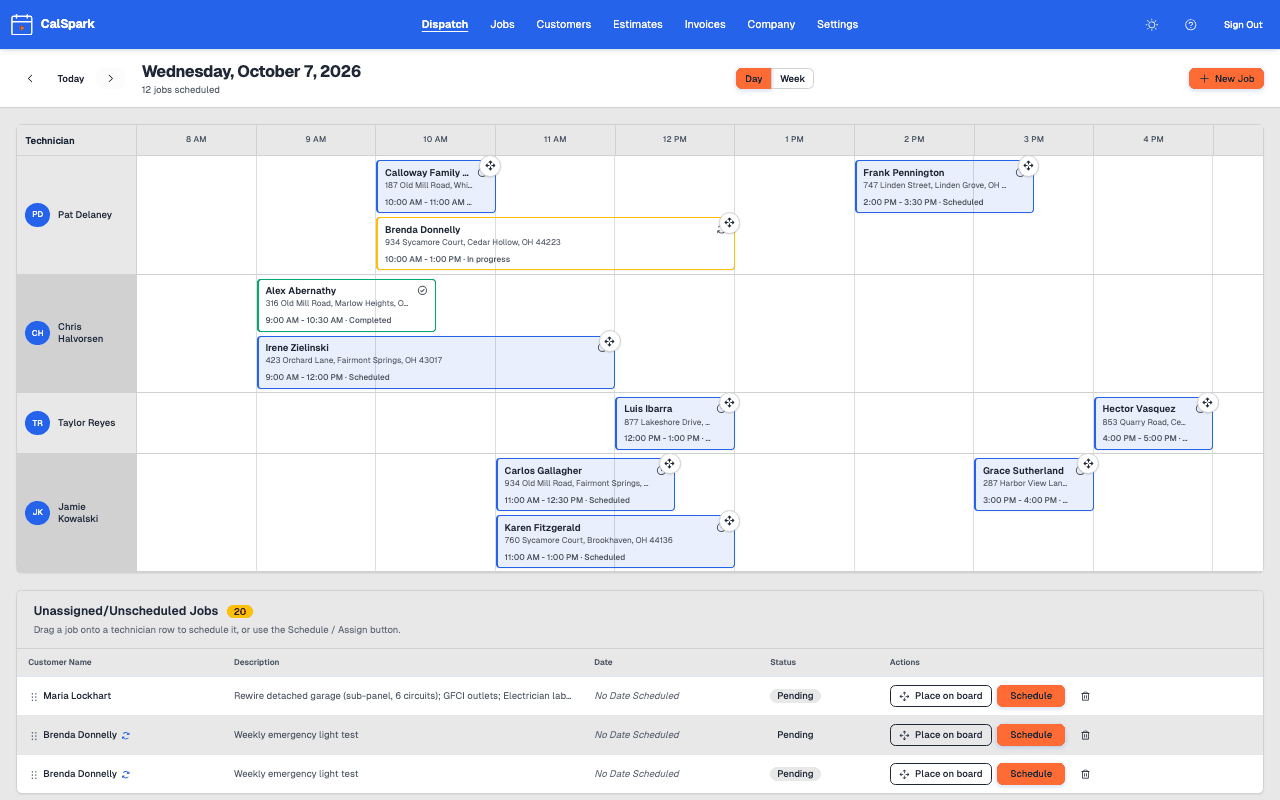
CalSpark is a dispatch board with one row per technician. Here is how that maps to the problems above.
- Emergency calls: click an empty spot on a tech row to create the job, or drag it from the unassigned list. If it overlaps something, you get a conflict warning, and you can choose to schedule anyway.
- Callbacks: create the return visit as a normal job on the same customer, with the original address and your notes on file.
- Parts runs: park the job as pending with no time, then drag it onto the board once the part is in hand.
- Unknown duration: block a generous window, and move the next job by dragging it to another tech or later in the day.
- Quotes: write an estimate for the water heater swap with line items for the unit, the tank and the haul-away. The customer approves from the email link, and you turn it into a job and a draft invoice.
- Repeat work: make an annual backflow test or a water heater flush a recurring job, every 12 months, so nobody has to remember to book it.
- Paperwork: add job photos of the old fitting and the finished work, then send an invoice with line items for labor and parts.
Customers can pay by card online through your own Stripe account, and your staff can record partial payments on the invoice. See the scheduling and invoicing pages for detail.
A day in a small plumbing shop
This is an illustrative day for a generic three-tech shop, not a real customer. It uses only what CalSpark does today.
- 6:45 amThe office opens the dispatch board. Three techs, five scheduled jobs, and two pending jobs waiting on parts sit in the unassigned list.
- 8:10 amA homeowner calls about a leaking supply line. The dispatcher creates the job and drags it onto the tech who finishes first. CalSpark warns of an overlap, so the dispatcher moves an afternoon job instead.
- 9:30 amA tech opens his phone browser, reviews the address and customer notes, taps On my way, and starts the job.
- 10:00 amThe office emails an estimate for a water heater replacement quoted yesterday. The customer approves it from the link before lunch, and the office chooses Create job. It lands in the pending queue until the unit is in stock.
- 11:15 amThe drain job is running long. The dispatcher drags the next appointment to a tech who has a gap, and calls the customer.
- 1:00 pmThe part arrives. The pending water heater job gets a time and a tech, and drops onto the board.
- 3:20 pmThe tech uploads photos of the new fitting from the technician view and marks the job complete.
- 4:00 pmThe office creates an invoice from the completed job and emails the PDF with a card payment link. The customer pays half now. The balance stays open.
What CalSpark does not do for plumbers yet
Some things plumbers ask for are not built. Here is where we stop, and what to use meanwhile.
- No turnkey texts to customers. The On my way button records the trip, but a text goes out only if you set up your own Twilio account and switch it on. Email reminders can be switched on in settings. Otherwise call or text customers yourself from your phone.
- No route optimization. You choose the order of stops by dragging jobs on the board.
- No parts inventory or van stock. Keep that in a spreadsheet or your supplier account.
- Estimates are plain line items. There is no price book, so keep your flat-rate prices in a list.
- Recurring jobs repeat a visit on a schedule. There is no separate service-plan billing.
Questions
Can I add an emergency call mid-day?
Yes. Click an open spot on a technician row, or drag a job from the unassigned list. If it collides with another job, CalSpark warns you, and an office user can schedule it anyway.
How do I handle a job waiting on a part?
Create it as pending with no date and time. It sits in the unassigned list. When the part arrives, drag it onto a technician row and it becomes scheduled.
Can I track warranty callbacks?
You can create a return visit as a normal job on the same customer and keep notes on it. There is no special warranty flag or report, so label it in the job notes.
Can a plumber take photos on site?
Yes. The technician view works in a phone browser and lets techs add job photos. They show up on the job for the office. Photos are not a substitute for a signed work order.
Can I send a quote for a water heater swap?
Yes. Build an estimate with line items, email it, and the customer approves or declines on a web page. An approved estimate becomes a job and a draft invoice.
Can customers pay the invoice by card?
Yes, through your own Stripe account. Record a deposit or cash payment on the invoice and the card page collects the remaining balance. Stripe charges its own processing fees, separate from CalSpark.
Will it work for a four-person plumbing shop?
Yes. The flat $49 a month covers up to 10 users, with admin, front office and technician roles. Try it free for 14 days, no card needed.
Keep reading
- Job scheduling and dispatch timelineA dispatch board with a row per technician, in day and week views. Click to create a job, drag to reschedule or reassign, and get a warning when two jobs overlap.
- Invoicing and online card paymentsInvoices with line items, PDF and email, pay links, card payment of the balance through your own Stripe account, staff-recorded partial payments and refunds. Estimates convert to draft invoices.
- A dispatcher daily checklist for a small shopA practical daily and weekly schedule checklist for the person dispatching 5 to 10 technicians, from the evening before to the end of the day.
- How to get contractor invoices paid fasterInvoice the same day, record deposits and partial payments, offer card payment and chase late invoices without souring the customer.
- Pricing: $49 a month flat for up to 10 usersOne plan. $49 a month for up to 10 users, no per-user fees. 14-day free trial with no card. See how it compares to per-user pricing.
Try it with your own jobs
14-day free trial. No card. $49 a month flat for up to 10 users after that.