For electricians
Scheduling and invoicing for electrical contractors
Electrical work depends on other people: inspectors, utilities, homeowners at home to grant access. CalSpark helps you keep service calls and project crews on one board while you juggle those windows.
Where electrical schedules break
Permits, inspections and failed inspections
Many jurisdictions require an inspection before you can close walls or energize a panel. Inspectors give windows, not times. If a rough-in fails, you owe a revisit, and the crew you planned for next week is suddenly short.
Rough-in, a gap, then trim-out
One job is really two visits with drywall in between. A customer with one address has two separate appointments, weeks apart, and someone has to remember the second one.
Utility shutoffs and access
A service upgrade may need the utility to cut power on a specific day. The homeowner has to be home, and the tech cannot start early. That date is fixed, and everything else bends around it.
Service calls versus project crews, and apprentices
A journeyman on a panel swap should not be pulled for a flickering light. An apprentice usually needs a licensed person alongside them, so two people are tied up on one job.
How CalSpark handles this today
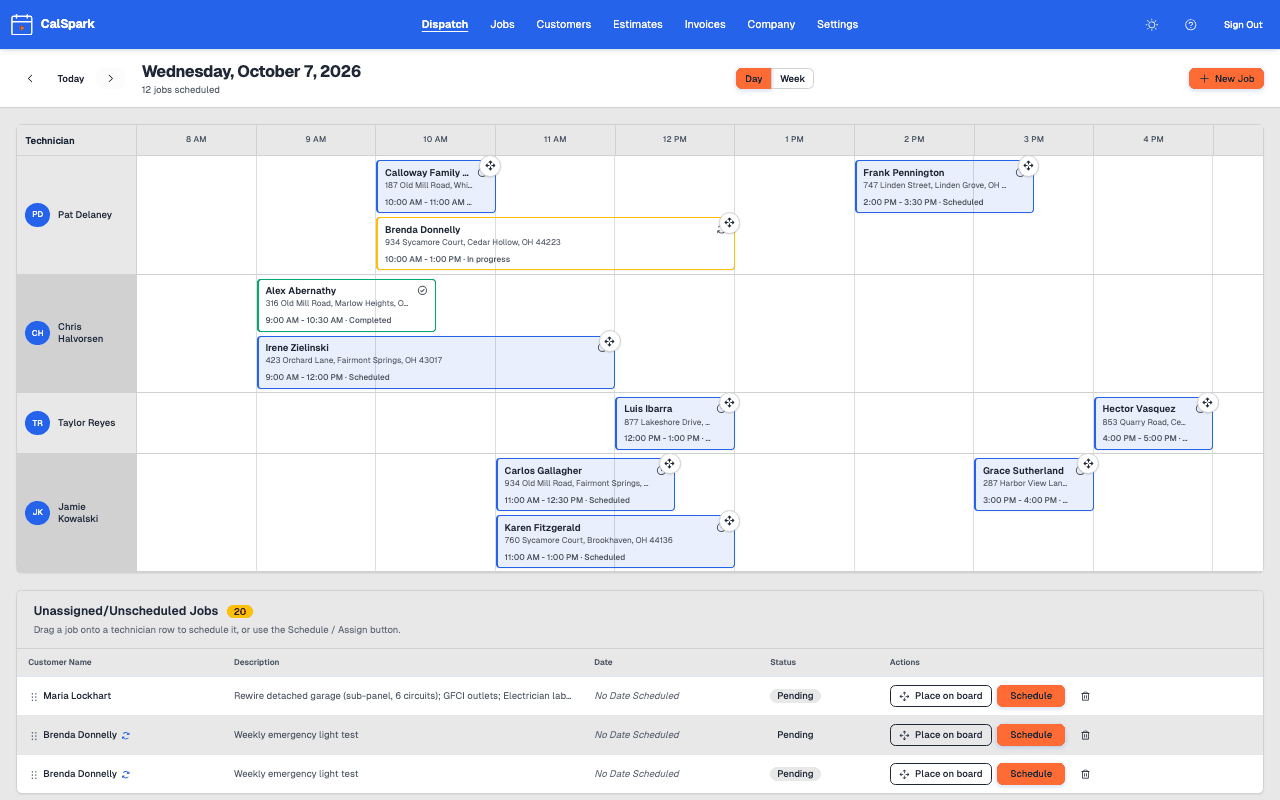
The dispatch board gives each person a row. You see who is booked before you promise a time.
- Inspections and revisits: create the inspection day as its own job. If it fails, add a revisit job, drag it to a free slot, or park it as pending until the inspector gives a window.
- Rough-in and trim-out: create two jobs on the same customer. Keep the trim-out pending until drywall is done, then give it a date.
- Shutoffs and access: put the fixed date on the board first. Customers can have multiple addresses, such as a landlord with several units, so pick the right one per job.
- Crews: assign a journeyman and an apprentice to the same job. Conflict warnings show when either one is double-booked, and you can schedule anyway when it is intentional.
- Bids: send an estimate with line items. The customer approves online, and you create the job and a draft invoice from it.
- Annual work: make a yearly inspection or generator service a recurring job.
- Billing: invoice with line items, send a PDF, and accept card payment. Recorded partial payments cover a deposit, a rough-in draw and a final balance.
The scheduling page shows how the board works. Import an existing customer list with the spreadsheet import guide.
A day in a small electrical shop
This is an illustrative day for a generic crew of four, not a real customer. It uses only what CalSpark does today.
- 6:30 amThe owner checks the board. A journeyman and an apprentice are on a panel upgrade, and a second journeyman has two service calls.
- 7:15 amThe panel crew opens the job on a phone browser, reads the customer note about the gate code, taps On my way, and starts it.
- 8:00 amThe office sends an estimate for a service upgrade. The homeowner approves it from the email link by mid-morning, and the office creates the job.
- 9:00 amThe inspector for a rough-in job gives a window of 1 to 3 pm. The office drags the inspection job onto the lead electrician row for that afternoon.
- 10:30 amA new no-power call comes in. The dispatcher sees the second journeyman is booked until noon, so she drags the call to a 1 pm slot instead. The board warns her when the first try overlaps.
- 1:45 pmThe inspection fails on a box fill issue. The office adds a revisit job for Thursday and attaches a photo of the correction.
- 3:30 pmThe panel job finishes. The crew uploads photos of the labeled panel and marks the job complete.
- 4:15 pmThe office invoices the work, with a partial payment received earlier showing against the balance.
What CalSpark does not do for electricians yet
Bid work and permits are a big part of electrical contracting, and CalSpark does not cover them. These are the gaps to plan around.
- Estimates are plain line items. There is no price book, so keep your standard prices in a list.
- No permit or inspection tracking field. Use the job notes, or a spreadsheet for permit numbers and inspector contacts.
- No QuickBooks sync, which is planned and not available. Your bookkeeper can work from an invoice CSV export or the PDFs.
- No multi-day job spans. A project is several jobs, each with its own date.
- No customer text messages. Email reminders exist, and texts need your own Twilio account.
Questions
How do I schedule an inspection?
Create it as a job for the day of the inspection, with the address and notes. If the inspector only gives a window, park it as pending and set the time when you get it.
What about rough-in and trim-out on the same house?
Make two jobs on the same customer and address. Leave trim-out pending until the walls are closed, then schedule it. CalSpark does not link them or create the second one automatically.
Can I pair an apprentice with a journeyman?
Yes. Assign both people to one job and both rows show it. Conflict warnings catch double-booking for either one. CalSpark does not check licensing or supervision rules.
Does it handle estimates for bid work?
For straightforward quotes, yes. An estimate has line items, tax, a discount, an expiry date, notes and terms, and the customer approves or declines on a web page. There is no price book. Approval gives you a pending job and a draft invoice.
Can I bill in stages on a big project?
Yes. Create several invoices on one job, or record partial payments against one invoice yourself. Customers can pay the remaining balance by card online through your own Stripe account.
Can a landlord with several properties be one customer?
Yes. A customer can have multiple addresses with notes, and you pick the right one for each job. A CSV import can bring the list in, with duplicate detection.
Keep reading
- Job scheduling and dispatch timelineA dispatch board with a row per technician, in day and week views. Click to create a job, drag to reschedule or reassign, and get a warning when two jobs overlap.
- Invoicing and online card paymentsInvoices with line items, PDF and email, pay links, card payment of the balance through your own Stripe account, staff-recorded partial payments and refunds. Estimates convert to draft invoices.
- How to import customers from a spreadsheetClean a customer spreadsheet, map columns, catch duplicates and test with ten rows before you load the rest into your field service software.
- What a small trades shop needs from field service softwareThe short list of features a 3 to 10 person shop uses every week, what it can skip, and how to test a tool with your own jobs.
- Pricing: $49 a month flat for up to 10 usersOne plan. $49 a month for up to 10 users, no per-user fees. 14-day free trial with no card. See how it compares to per-user pricing.
Try it with your own jobs
14-day free trial. No card. $49 a month flat for up to 10 users after that.