Available
Calendar feeds for Google, Apple and Outlook
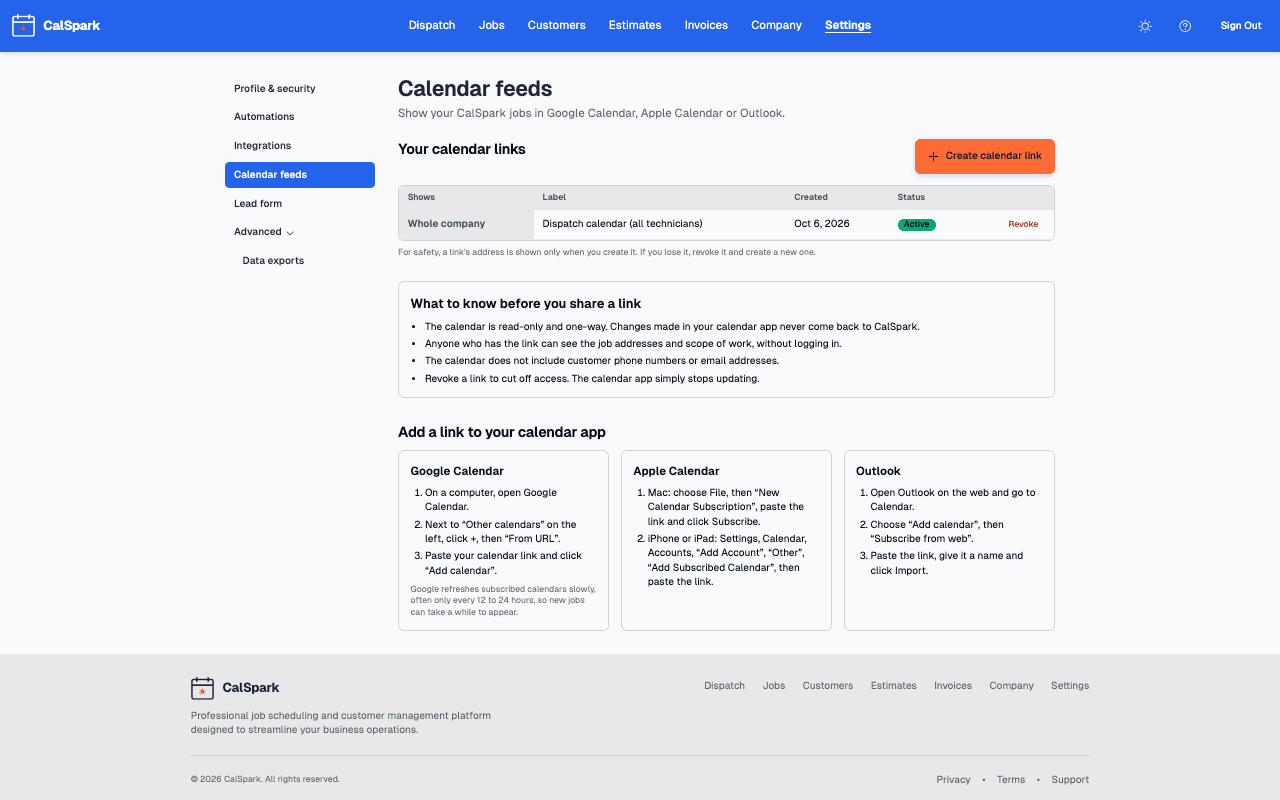
A private link per technician, or one for the whole company, that shows scheduled jobs in the calendar app people already use. It is read only and one way. Available to every company.
Menu path: Settings, Calendar feeds. Updated .
What it does
- Each event is a scheduled job. The title is the customer name and the first line of the scope of work. The description has the job number and scope, and the location is the job address.
- Moving or reassigning a job on the dispatch board changes the event. Cancelled jobs show as cancelled. Pending jobs show as tentative.
- A personal link shows only that technician's jobs. A company link shows every job.
- The calendar carries no customer phone number or email address.
Anyone who has the link can see job addresses and scope of work without logging in. Treat it like a key. Revoke a link to cut it off.
Set it up, step by step
Only admins can create links. A technician who wants one asks an admin.
- Open Settings, then Calendar feeds, then Create calendar link.
- Choose who it shows: one person, or Whole company (every job).
- Add a label so you know which device it belongs to. Create the link and copy the address now. It is not shown again.
- Subscribe in the calendar app. Exact steps for Google Calendar, Apple Calendar and Outlook are in the calendar subscription guide.
Limits and what to expect
- One way. Changes made in the calendar app never come back to CalSpark. To move a job, use the dispatch board.
- The feed covers jobs from 30 days back to 180 days ahead, up to 2,000 jobs.
- Refresh is up to the calendar app. The feed asks for hourly updates, but Google often takes 12 to 24 hours. Do not use a calendar feed for a same-hour change: tell the technician.
- Times show in your company time zone, which you set in company settings.
- This is not two-way Google Calendar sync. That is planned, with no date.
Questions
Does it work with Outlook and Apple Calendar?
Yes. Any calendar app that can subscribe to an iCalendar link by URL can use it. Google Calendar, Apple Calendar and Outlook on the web all can.
Why did my new job not show up yet?
The calendar app decides when to refresh. Google in particular can take many hours. The job is already on the dispatch board and in the technician web view.
A technician lost their phone. What now?
Open Settings, Calendar feeds, revoke that link and create a new one. The old address stops working.
Can the technician edit jobs from the calendar?
No. The calendar is read only. Technicians update status and photos in the phone web view.
Is customer contact information included?
No phone numbers or email addresses. The customer name, job scope and address are included.
Keep reading
- Subscribe to Your Job Calendar in Google, Apple or OutlookCreate a CalSpark calendar link, add it to Google Calendar, Apple Calendar or Outlook, and learn what shows up, how often it refreshes and how to revoke it.
- Technician view and iOS app statusTechnicians use the web view on any phone today to see jobs, tap On my way, update status and add photos. The iOS app is built but not in the App Store.
- Job scheduling and dispatch timelineA dispatch board with a row per technician, in day and week views. Click to create a job, drag to reschedule or reassign, and get a warning when two jobs overlap.
- Integrations: what works today and what is plannedEvery integration with a one-line status. Live: Stripe, Slack, calendar feeds, API, webhooks. Texts need your own Twilio account. Planned, not available: Zapier, QuickBooks, Google Calendar push.
- Webhooks and API: setup, examples and limitsTurn on the API in Company, Features, then create API keys and add a signed webhook endpoint under Settings, Developers. A worked example and the limits.
Try it with your own jobs
14-day free trial. No card. $49 a month flat for up to 10 users after that.