Available
Stripe: take card payments on invoices
Connect your own Stripe account once, and every invoice gets a secure pay link. The customer pays the remaining balance by card, and the money goes to your Stripe account, not to CalSpark. Stripe sets the fees and the payout schedule.
Menu path: Company, Billing tab. Updated .
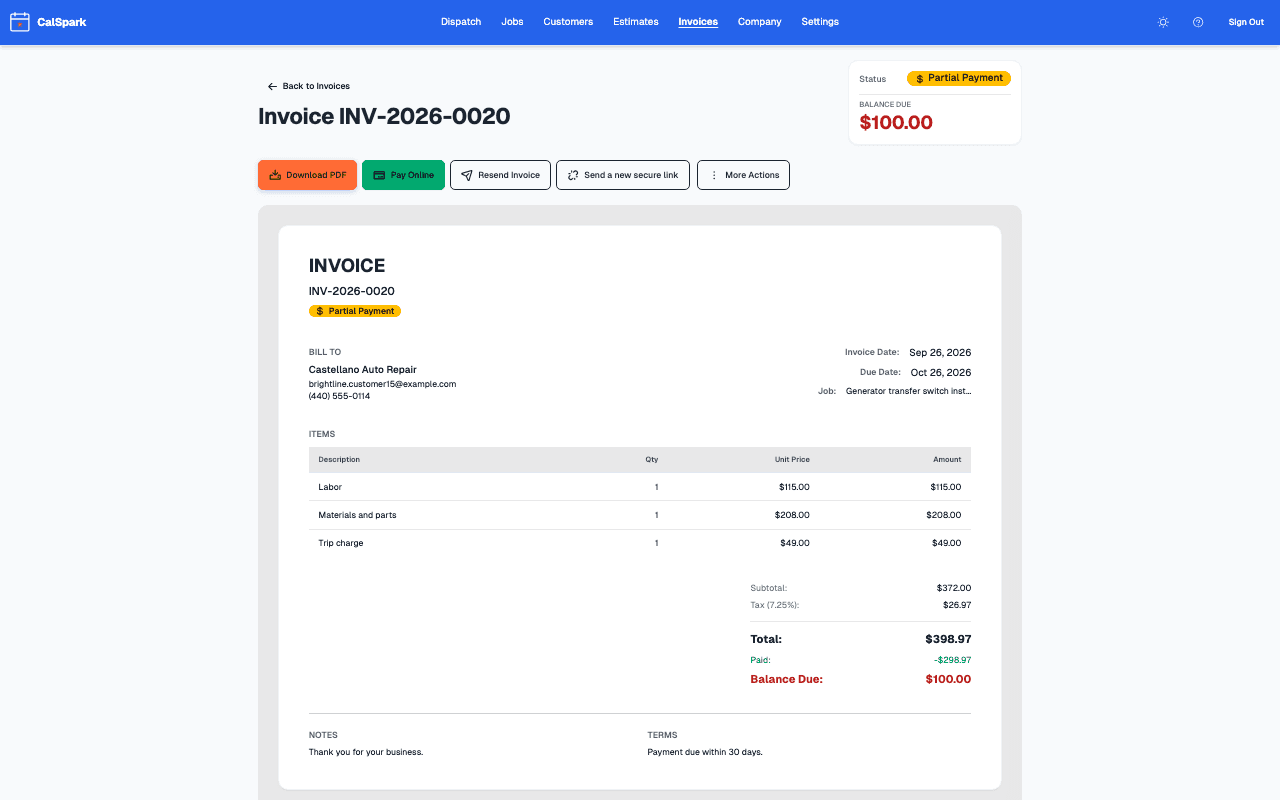
How a payment works
Each sent invoice carries a secure pay link. The customer opens it on a phone or computer, reviews the invoice and pays by card. Stripe processes the card and pays you on its own schedule. CalSpark does not hold your money and adds nothing to the Stripe fee.
The link always asks for the full remaining balance. If you already recorded a deposit or a cash payment on the invoice, the link asks for what is left.
Limits to know before you rely on it
- The card page cannot take a part payment. A customer cannot choose to pay half online. Part payments, such as a deposit or a cash or check payment, are recorded on the invoice by your staff.
- There is no deposit request on an estimate. For a deposit, create an invoice for that amount and send it.
- Stripe sets its processing fees and when payouts arrive. See Stripe's own pricing page for the current rates in your country.
- Refunds are reflected on the invoice, so the record stays accurate.
- Stripe may ask for more information about your business at any time. Until it is provided the account can show as Restricted.
The other invoicing features are covered on the invoicing page. Ideas for getting paid faster are in how to get contractor invoices paid faster.
Questions
Does CalSpark take a cut of card payments?
No. Payments go to your own Stripe account. Stripe charges its own processing fees, separate from the CalSpark plan.
Can a customer split an invoice across several card payments?
No. The card page collects the full remaining balance. Your staff record partial payments, such as a cash deposit, on the invoice, and the card page then asks for the rest.
Who can connect Stripe?
An admin, from the Billing tab under Company. You connect it once for the company.
What if my Stripe account shows Restricted?
Stripe needs more information from you. Use the button on the Stripe card to continue onboarding. Card payments on invoices may not work until it clears.
Do I need Stripe to use invoices?
No. Without it you can still create, email and print invoices and record payments yourself. Stripe is only for online card payment.
Keep reading
- Invoicing and online card paymentsInvoices with line items, PDF and email, pay links, card payment of the balance through your own Stripe account, staff-recorded partial payments and refunds. Estimates convert to draft invoices.
- How to get contractor invoices paid fasterInvoice the same day, record deposits and partial payments, offer card payment and chase late invoices without souring the customer.
- Overdue Invoice Follow-Up Schedule for ContractorsA day-by-day overdue invoice follow up schedule for contractors, with email wording for each step, a call script, and what CalSpark automates and what stays manual.
- Pricing: $49 a month flat for up to 10 usersOne plan. $49 a month for up to 10 users, no per-user fees. 14-day free trial with no card. See how it compares to per-user pricing.
- Integrations: what works today and what is plannedEvery integration with a one-line status. Live: Stripe, Slack, calendar feeds, API, webhooks. Texts need your own Twilio account. Planned, not available: Zapier, QuickBooks, Google Calendar push.
Try it with your own jobs
14-day free trial. No card. $49 a month flat for up to 10 users after that.